Single Sunflower Template for Creative Projects
There is a unique magic in the simplicity of a single bloom. It strips away the noise of a garden and focuses entirely on the intricate geometry of nature. The Single Sunflower Template captures this essence, offering creators a precise blueprint to transform digital files into tangible art. Whether you are crafting massive wall installations or delicate home decor accents, this template serves as the foundational element for projects that demand both structural integrity and organic beauty.
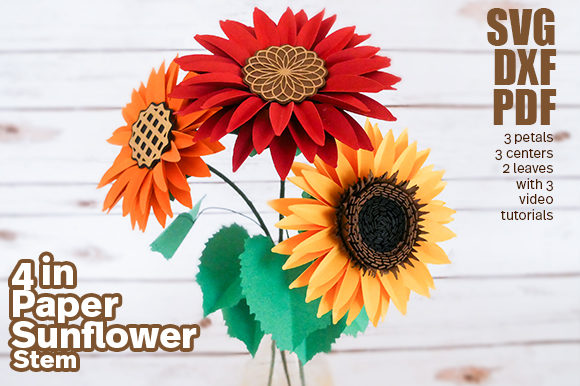
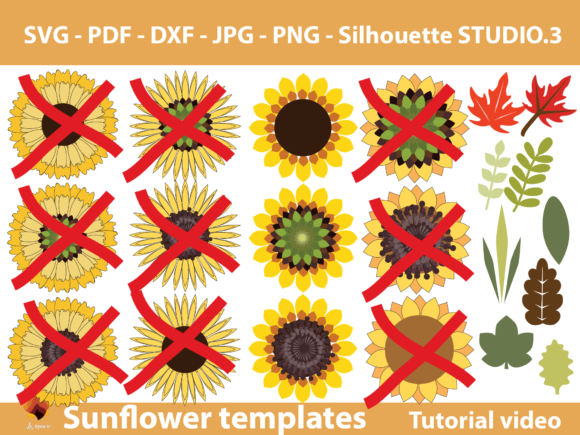
Included within Set 04 of our Sunflower templates, this design is more than just a silhouette; it is a comprehensive toolkit. The package provides a versatile array of file formats—PDF, SVG, DXF, PNG, and JPG—ensuring that your workflow remains seamless regardless of your preferred method. From the detailed leaves to the textured centers, every component is engineered to allow you to scale from XXS miniatures to XXXL statement pieces without losing definition.
Adapting the Design Across Cutting Platforms
The versatility of the Single Sunflower Template lies in its multi-format availability. For users who own vinyl cutters like Cricut or Silhouette machines, the choice between DXF and SVG depends largely on the complexity of the project. If you are planning a straightforward cut with solid shapes, the DXF format works efficiently for both major machine brands. However, for designs requiring intricate layering, complex curves, or detailed leaf veins, switching to the SVG file is highly recommended. SVGs preserve vector paths perfectly, allowing your machine to execute smooth, continuous cuts that bring the flower's natural elegance to life.
For those who prefer traditional methods or do not have access to electronic cutting machines, the PDF option is ideal. You can print the template directly onto cardstock or heavy paper and use scissors for hand-cutting. To ensure the highest quality for hand-crafting or laser engraving, we recommend downloading the high-resolution JPG and PNG versions from our drive. These raster images provide clear contrast lines, making them easy to trace or cut freehand while maintaining the integrity of the original design.
- DXF Files: Best for standard Cricut and Silhouette operations with simple shapes.
- SVG Files: Essential for complex designs requiring fine detail and layering.
- PDF & JPG/PNG: Perfect for hand-cutting, laser engraving, or printing large-scale murals.
Creative Applications for Every Professional
The potential applications for this template extend far beyond simple craft projects. For interior designers and event planners, the Single Sunflower Template offers a scalable solution for creating immersive environments. Imagine a wedding backdrop featuring oversized sunflowers crafted from layered fabric or felt, or a corporate office lobby adorned with metallic gold cutouts that catch the light. Because the template supports sizes ranging from XXS to XXXL, you can create visual rhythm by mixing scales—a giant central bloom surrounded by medium-sized accents and tiny filler flowers.
Educators and hobbyists will find immense value in the tutorial videos included with the set. These resources guide users through the assembly process, teaching techniques for wire wrapping, gluing layers, and adding dimension. A teacher might use this project to demonstrate geometry and symmetry to students, while a blogger could document the step-by-step creation of a seasonal wreath. The flexibility of the design allows for endless variations in color, texture, and material, encouraging experimentation with everything from recycled cardboard to premium velvet.
Entrepreneurs and small business owners can leverage this template to launch product lines. Consider creating kits for DIY enthusiasts, complete with pre-cut petals and assembly instructions. Alternatively, use the design to produce custom signage for boutiques or cafes. The clean lines of the sunflower make it an excellent subject for branding elements, ensuring that your logo or promotional materials remain consistent and professional across different media.
Techniques for Clear and Consistent Results
To achieve results that look polished and professional, consistency is key. When working with multiple units of the Single Sunflower Template, maintain a uniform approach to sizing and coloring. If you are creating a bouquet, ensure that all petals are cut from the same batch of material to avoid color discrepancies. Use the provided center piece as a guide for alignment; placing it accurately ensures the flower looks balanced and authentic.
Organization plays a crucial role in managing larger projects. Before cutting, lay out all your pieces according to size and layer. Labeling your files or physical stacks can save time during the assembly phase. For digital users, keep your design software organized by grouping layers logically. This practice not only streamlines the cutting process but also makes troubleshooting easier if adjustments are needed later.
Interpreting the Sunflower for Modern Contexts
While the sunflower is a classic symbol of warmth and joy, its interpretation can shift based on context. In a minimalist setting, a single black-and-white cutout can convey sophistication and modernity. In a vibrant children's room, bright yellows and greens bring energy and playfulness. The Single Sunflower Template adapts to these moods effortlessly because of its clean, recognizable structure.
Designers can experiment with negative space by leaving parts of the flower uncut or using the template as a stencil for painting. Marketers might use the image in social media graphics to evoke feelings of summer and growth. The ability to modify the design means you can add text, combine it with other floral elements, or integrate it into mixed-media collages. This adaptability ensures that the template remains relevant whether you are creating a quick social post or a year-long installation.
Remember that creativity thrives on constraints. By starting with a defined shape like the sunflower, you free yourself to focus on execution rather than invention. Use the template as a springboard for your own ideas. Perhaps you want to twist the petals into a spiral, or maybe you wish to combine it with geometric patterns. The tools are there; the vision is yours.
Maximizing Your Project Potential
Whether you are a seasoned pro or just picking up a cutting machine for the first time, the Single Sunflower Template provides a reliable foundation. The inclusion of tutorial videos bridges the gap between theory and practice, offering visual guidance that complements the written instructions. This support system helps ensure that even complex projects feel manageable and achievable.
As you begin your project, think about the end goal. Are you aiming for durability? Then choose thicker materials and secure bonding agents. Do you need portability? Opt for lightweight fabrics or foam board. The template does not dictate the outcome; it empowers you to decide. By understanding the capabilities of each file format and applying thoughtful techniques, you can create work that stands out in a crowded marketplace.
Embrace the process of making. There is satisfaction in transforming a flat digital file into a three-dimensional object that brings joy to others. Let the Single Sunflower Template be your guide, but let your creativity lead the way. With the right tools and a clear plan, the possibilities are as boundless as the sky itself.