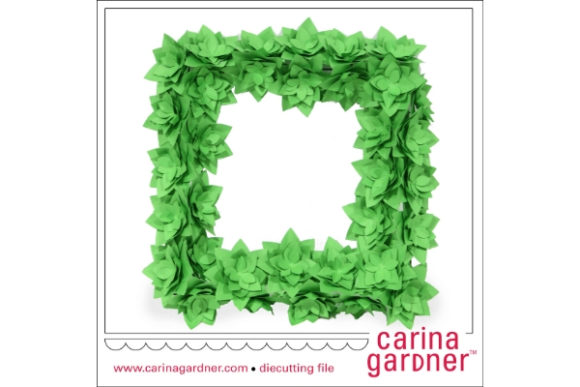
Succulent Wreath: Creating Lasting Greenery Without the Maintenance
There is a distinct satisfaction in hanging a wreath that looks lush, vibrant, and perfectly balanced. The Succulent Wreath concept has taken the crafting world by storm because it offers the aesthetic appeal of a living garden without the daily watering, sunlight requirements, or seasonal die-off associated with real plants. However, simply downloading a design file and hitting "cut" does not guarantee a professional result. Many creators jump into this project assuming that digital files are plug-and-play, only to find their machines struggle, their materials waste away, or their final product looks amateurish.
To get the most out of your crafting time and budget, you need to understand what lies beneath the surface of a standard download. This guide explores the nuances of using Succulent Wreath designs, focusing on common pitfalls and how to navigate them effectively.
Understanding the Digital Assets You Are Buying
When you acquire a package containing SVG and PNG files for a Succulent Wreath, you are purchasing more than just an image; you are buying instructions for a physical object. The value of these files depends entirely on your workflow and the software you use. A common misunderstanding among beginners is assuming that all cutting machines interpret vector data identically. While Silhouette Studio, Cricut Design Space, and Brother Scan N Cut are powerful tools, they handle layer nesting and cut lines differently.
If you purchase a file that relies heavily on complex grouping without clear layers, you might spend hours untangling your design in Adobe Illustrator before you even touch the machine. Always verify that the included SVG file contains separate paths for each succulent leaf, pot, and background element. If everything is grouped into a single "compound path," you will lose the ability to change colors or materials for individual parts, which is essential for creating depth and realism in a wreath.
The Hidden Cost of Poor File Structure
One of the most frustrating mistakes involves skipping the pre-cut inspection phase. Before loading any vinyl, cardstock, or heat transfer material, you must check the file structure. If the design lacks proper cut lines or if the bounding box is too large, your machine may attempt to cut outside the intended area, wasting expensive material. Furthermore, some low-quality downloads include raster images disguised as vectors. These cannot be resized without losing quality, making them useless for scaling up a small digital preview to a 24-inch wreath.
Always open the SVG in a vector editor like Adobe Illustrator or Inkscape (if compatible) to inspect the nodes. Ensure that the leaves have smooth curves and that the stems connect logically. If the file requires manual tracing because the lines are broken, you are essentially paying for a tutorial rather than a finished product. A high-quality Succulent Wreath file should be ready to cut immediately after import.
Selecting the Right Materials for the Look
Even with perfect digital files, the final presentation hinges on material choice. A frequent error is treating paper and vinyl as interchangeable mediums. Paper succulents offer a soft, matte texture that mimics real foliage beautifully but can warp if exposed to humidity. Vinyl, on the other hand, provides durability and a glossy finish but can look artificial if the wrong shade is chosen.
Consider the end goal of your project. If you are creating a door decoration for a small business, durability is paramount. In this case, using a weather-resistant outdoor vinyl is a better approach than standard indoor adhesive vinyl, which may peel within weeks. Conversely, if you are making a gift tag or a scrapbook embellishment, cardstock or patterned paper adds a tactile element that vinyl cannot replicate.
Another overlooked detail is the backing material. Many creators forget that a wreath needs a base to hold the pieces together. Using a plain wire hanger often results in a flimsy product that sags under the weight of multiple layers. Instead, consider using a grapevine wreath form or a foam ring. When assembling the Succulent Wreath, ensure you have enough adhesive strength to hold the layers without slipping. Hot glue works well for heavy materials, but double-sided tape is better for delicate paper layers.
Optimizing Your Cutting Workflow
Machines vary significantly in their handling of intricate details. A design that cuts perfectly on a Cricut Explore Air might jam on a Silhouette Cameo if the blade pressure is not adjusted correctly. The key to avoiding frustration is understanding the specific settings required for your chosen material. For example, cutting thick chipboard requires a different blade depth than cutting thin cardstock. Failing to adjust these settings leads to incomplete cuts, forcing you to manually weed the design—a tedious process that increases the risk of tearing delicate leaves.
Before starting a production run, always perform a test cut. This simple step saves money on materials and prevents the disappointment of ruining a large sheet of expensive vinyl. Check the weeding process as well. Some Succulent Wreath designs feature very fine veins on the leaves. If you do not have sharp weeding tools or good lighting, you might accidentally remove parts of the design along with the negative space. Patience here pays off in the final appearance.
Color Matching and Layering Strategies
To achieve a realistic look, avoid using solid colors for every leaf. Real succulents have gradients, speckles, and variations in tone. A common mistake is using a single shade of green for the entire wreath, which makes the project look flat and digital. Instead, layer two or three shades of green, perhaps adding a touch of cream or pale yellow at the tips of the leaves. This technique, known as color blocking or layering, adds dimension and visual interest.
If you are using a printer to create custom patterns on vinyl, ensure your design file includes bleed areas. Without a bleed, white edges may appear around the cut lines when the material is applied to the base. Properly preparing your files in Adobe Illustrator or Cricut Design Space ensures that your printed designs align perfectly with the cut contours.
Evaluating Compatibility and Software Needs
Not all devices support every file format equally. While SVG is the industry standard for vector graphics, some older versions of Cricut Design Space may struggle with extremely complex files containing thousands of nodes. If you encounter lag or crashes, try simplifying the design or converting the file to DXF format, which is often lighter for certain machines. Similarly, users of Brother Scan N Cut should verify that their firmware is up to date to ensure full compatibility with modern SVG structures.
For professionals and entrepreneurs, the ability to edit the file is crucial. If you plan to sell products made from these designs, ensure you have the rights to modify the artwork. A flexible Succulent Wreath package allows you to rearrange elements, change sizes, or add text without breaking the design integrity. This flexibility is vital for branding and customization.
Final Considerations for Success
Investing in a high-quality Succulent Wreath design file is an investment in your time and reputation. By taking the time to inspect the file structure, selecting appropriate materials, and optimizing your machine settings, you avoid the common traps that lead to wasted resources and disappointing results. Remember that the best projects come from preparation and attention to detail.
Whether you are a hobbyist looking to decorate your home or a small business owner expanding your product line, understanding the technical aspects of digital crafting gives you the edge. Don't rush the process. Take a moment to review your files, test your cuts, and plan your layering strategy. With the right approach, your Succulent Wreath will be a stunning centerpiece that stands the test of time, offering the beauty of nature without the maintenance.